> For the complete documentation index, see [llms.txt](https://hthcapital.gitbook.io/izigift-help-docs/llms.txt). Markdown versions of documentation pages are available by appending `.md` to page URLs; this page is available as [Markdown](https://hthcapital.gitbook.io/izigift-help-docs/getting-started/quickstart.md).

# Quickstart

The necessary steps to get started with iziGift

When you arrive into the iziGift app you will initially see the page below. This is the iziGift Dashboard

<figure><img src="https://3362315347-files.gitbook.io/~/files/v0/b/gitbook-x-prod.appspot.com/o/spaces%2Fty9FI1hwhkeIghtU8k7H%2Fuploads%2FVEEg8OsU5akJkypSriz5%2FiziGiftOnboardingDashboard.jpg?alt=media&amp;token=0f994b39-8549-4378-b26c-047cc044889a" alt=""><figcaption></figcaption></figure>

From here you will do everything to get the app set up.

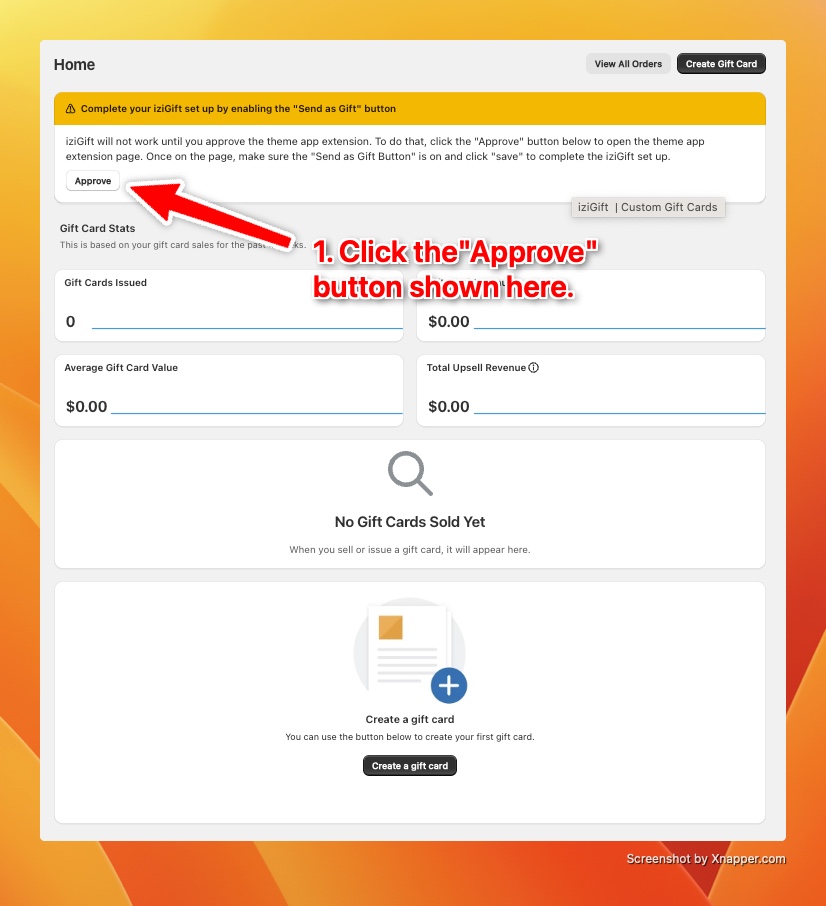
Step 1: Approve the theme app extension.

In order for our app to work properly you need to have this enabled. It is easy to do. Below are the steps:

<figure><img src="https://3362315347-files.gitbook.io/~/files/v0/b/gitbook-x-prod.appspot.com/o/spaces%2Fty9FI1hwhkeIghtU8k7H%2Fuploads%2FBvjouoMXc12pJQHwgLr0%2FiziGiftOnboarding-CreateGiftCardStep1.jpg?alt=media&amp;token=5ad8f7c0-8466-405c-8778-e55244833fde" alt=""><figcaption></figcaption></figure>

Once you click that, you will be guided to a page to save the settings.

<figure><img src="https://3362315347-files.gitbook.io/~/files/v0/b/gitbook-x-prod.appspot.com/o/spaces%2Fty9FI1hwhkeIghtU8k7H%2Fuploads%2FB4rreT3yPHJYp99HVzok%2FiziGiftOnboarding-ApproveThemeAppExtensionStep2.jpg?alt=media&amp;token=427a6438-9d39-4207-b58c-b070b52b538b" alt=""><figcaption></figcaption></figure>

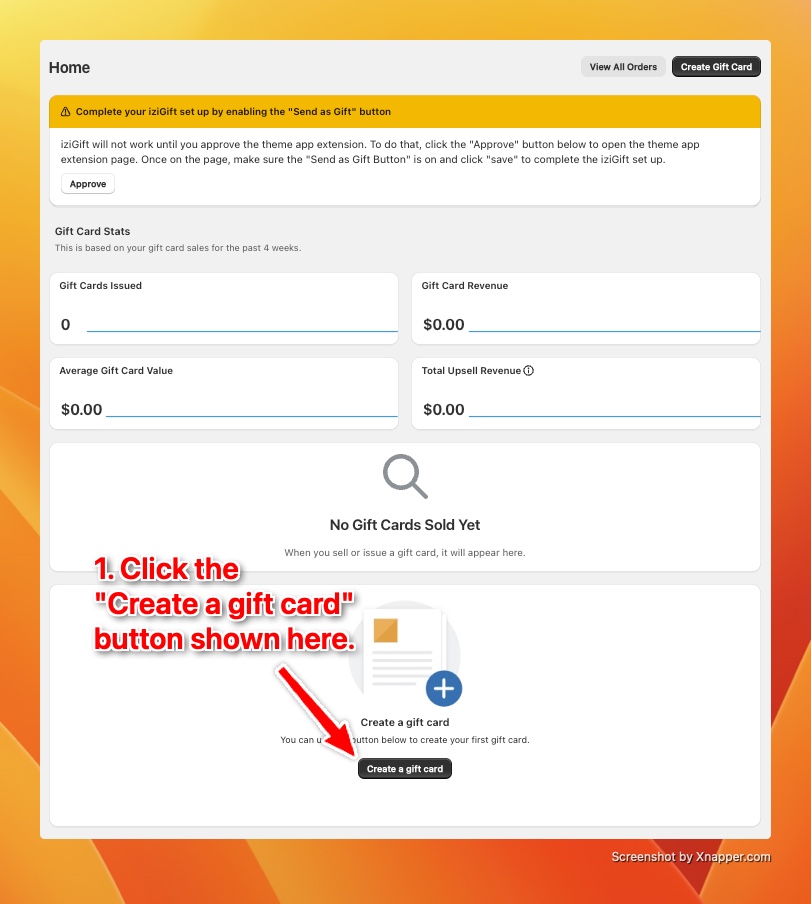
After you save, go back to the dashboard and create your first gift card. Below are the steps:

<figure><img src="https://3362315347-files.gitbook.io/~/files/v0/b/gitbook-x-prod.appspot.com/o/spaces%2Fty9FI1hwhkeIghtU8k7H%2Fuploads%2FcQ2NVck1Sun6HUQ7Kvvj%2FiziGiftOnboarding-CreateGiftCardStep1.jpg?alt=media&amp;token=11266bcc-3a12-4833-83a8-521fd28934d3" alt=""><figcaption></figcaption></figure>

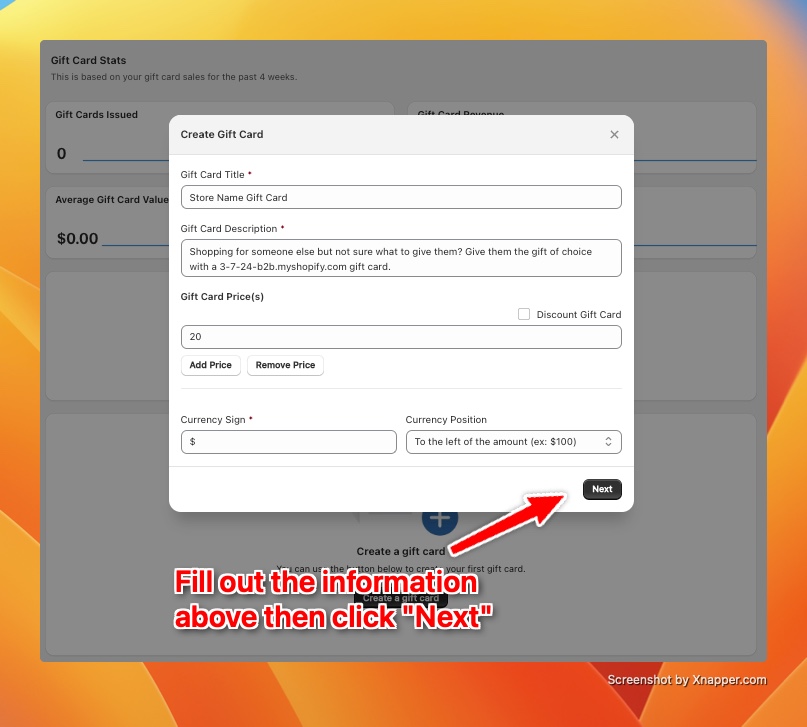
That will open up the "Create a gift card" modal

<figure><img src="https://3362315347-files.gitbook.io/~/files/v0/b/gitbook-x-prod.appspot.com/o/spaces%2Fty9FI1hwhkeIghtU8k7H%2Fuploads%2Fru9JXFrtjQKL6GZjUyuq%2FiziGiftOnboarding-CreateGiftCardStep2.jpg?alt=media&amp;token=da2c928b-d0c4-43df-a050-f640d1e18197" alt=""><figcaption></figcaption></figure>

That will then take you to the final page of the create gift card steps, selecting your gift card image.

<figure><img src="https://3362315347-files.gitbook.io/~/files/v0/b/gitbook-x-prod.appspot.com/o/spaces%2Fty9FI1hwhkeIghtU8k7H%2Fuploads%2FCJtxsWz5yreVMSq0YJX7%2FiziGiftOnboarding-CreateGiftCardStep3.jpg?alt=media&amp;token=dc5df1c7-00ed-470d-9cd3-eb3eee7042b8" alt=""><figcaption></figcaption></figure>